
TL;DR:
- Updating your website means improving how it looks and works so it serves visitors and the business better.
- Run a proper audit and set clear goals before making visual changes or structural redesigns, so you protect search rankings and the habits of regular visitors.
Updating your website design means improving its look and function to strengthen user experience and business results. Doing it well separates a site that converts from one that quietly loses visitors. The first decision is whether the site needs a visual refresh or a full structural redesign. The refresh vs redesign distinction matters: a refresh updates colours, fonts and images with little SEO disruption, while a redesign changes the information architecture and conversion paths. Getting that right before you touch a page saves weeks of rework and protects your rankings.
What should you sort out before updating your website design?
The most common mistake is jumping into visual changes before doing an audit. An audit gives you a factual baseline. Without one, you cannot tell whether the update improved anything.
Start with a content and performance audit. Go through every page and mark the content as keep, update or remove. Removing outdated content and adding new content that fits your brand messaging keeps the site focused. Pair this with a review of your analytics: goals, event tracking and attribution.
If you do not document your existing analytics and conversion tracking, you will not be able to measure whether the update worked. That makes future budget decisions harder to justify. Auditing your measurement setup before anything goes live is essential.
Next, set clear goals. What must the update achieve? Common goals include lowering bounce rate, increasing contact form submissions or improving mobile load speed. Tie each goal to a specific KPI so you can track it after launch.
Use this checklist before starting:
- Content audit: flag pages with outdated information, thin content or broken links
- Analytics audit: confirm goals, events and conversion tracking are documented
- Performance baseline: record current page speed, bounce rate and top traffic pages
- Goal definition: write down three to five measurable outcomes the update must deliver
- Priority pages: identify the pages that drive the most traffic or revenue and update those first
Pro tip: Use an impact/effort matrix to rank your fixes. Doing the quick wins first, before the foundational changes, keeps momentum up and shows early results to stakeholders.
How to carry out a website design update step by step
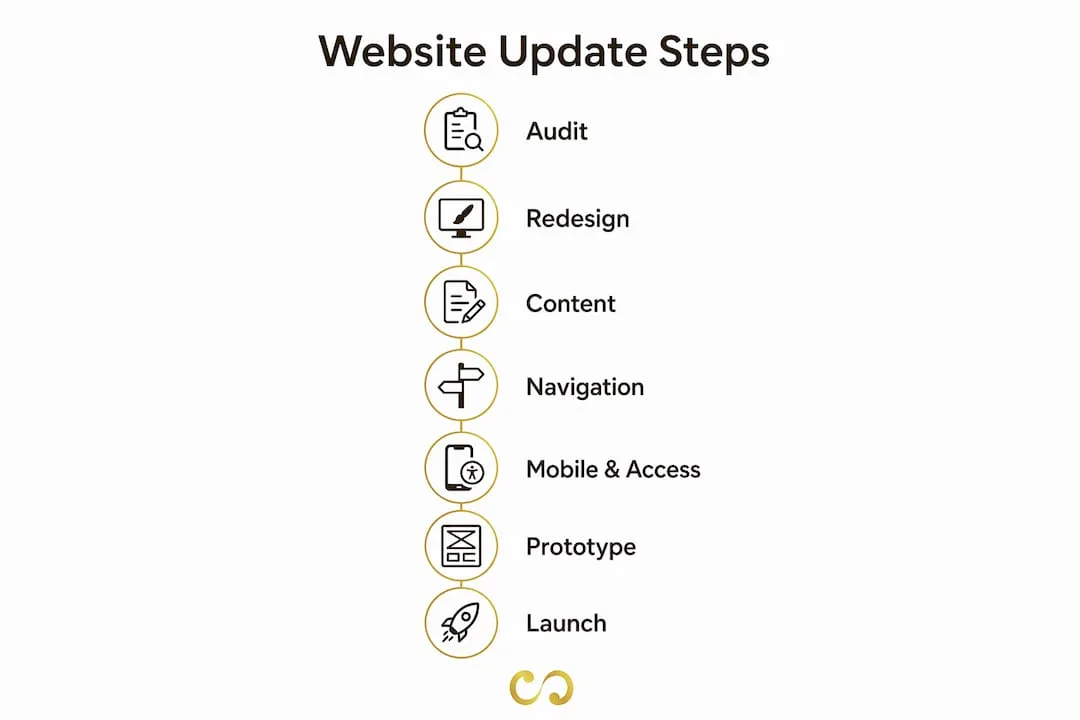
A structured process prevents the chaos that derails most site updates. Follow these five steps in order and you will avoid the most common mistakes.
Step 1: Redesign your visual elements
Start with colour, typography and imagery. Choose a palette that reflects your current brand identity. Switch to modern web fonts that load quickly and read clearly on every screen size. Replace stock photos with original images where you can. Authentic visuals improve your marketing results more reliably than generic imagery.

Step 2: Update content for SEO and messaging
Rewrite page copy to match your current brand voice and target keywords. Cut jargon. Shorten paragraphs. Add headings that answer real questions your customers ask. Aligning content with SEO during the update, rather than afterwards, saves a second round of edits.
Step 3: Improve navigation and layout
Simplify the menu. Visitors should reach any key page within two clicks of the homepage. Rearrange the layout so the most important content appears near the top of the page. Clear calls to action on every page remove guesswork and help conversion.
Step 4: Check mobile compatibility and accessibility
Testing on several devices and browsers confirms that your responsive design still works after the update. Check colour contrast for accessibility, and make sure buttons are big enough to tap on a phone. Accessibility is not optional: it decides whether everyone can use your site, and the same fixes (clear structure, alt text, readable text) also help search engines understand your pages.
Step 5: Use wireframes, test prototypes and gather feedback
Before going live, build wireframes to map the new layout. Figma, Sketch and Adobe XD support collaborative design and cut down on costly rounds of changes. Share prototypes with a small group of real users or colleagues, collect feedback on navigation and visual appeal, then adjust before launch.
Pro tip: After any URL or structural change, update internal links across the whole site. Broken internal links hurt SEO and frustrate visitors who hit dead ends.
The order matters. Skipping wireframes and editing the live site directly is the quickest way to end up with a site that looks updated but works worse than before.
What are the common pitfalls and how do you fix them?
Most website update problems are predictable. Knowing them in advance lets you build safeguards into the process.
Radical visual changes made too often confuse returning visitors and harm consistency. Frequent major redesigns disrupt user habits and can unsettle rankings if they are not managed carefully. Gradual, purposeful changes keep trust while moving the site forward.
The most damaging pitfall is losing SEO value during structural changes. If you change URLs without 301 redirects, links pointing to the old pages stop passing value and search engines treat the new URLs as brand-new pages. Set up redirects before the new site goes live, not after.
Watch for these too:
- Incomplete tracking: if analytics events are not reconfigured after the update, you cannot compare performance before and after
- Broken links: internal and external links break when page slugs change, so run a link checker straight after launch
- Slower pages: new images, fonts or scripts can slow load times, so run a speed test before and after every major change
- Browser differences: a layout that looks perfect in Chrome may break in Safari or Firefox, so test in at least three browsers before launch
- Post-launch surprises: keep a staging environment for two weeks after launch so you can make fixes without touching the live site
Clear ownership keeps the project on track. Give one person responsibility for the update roadmap and sign-off on each phase before the next starts, with an agreed route for escalating problems.
How do you measure the impact of your updated design?
Measurement starts before launch. Set up tracking during the audit so you have clean data from day one.
Track these from launch onwards:
- Organic traffic: compare month-on-month sessions from search engines
- Bounce rate: a lower bounce rate suggests visitors find the new design more relevant
- Conversion rate: track form submissions, purchases or calls relative to visits
- Page speed score: use Google PageSpeed Insights to confirm load times improved
- Core Web Vitals: Google uses these as part of its page experience signals in search
Monthly plugin reviews and quarterly speed tests catch problems early and protect the gains from your update. Security patches matter too: an outdated plugin is a common way in for attacks that can take a site offline.
Build a simple maintenance calendar. Review content every quarter to remove stale pages and add new material. Check for broken links monthly. Look at your analytics weekly for the first 90 days after launch, then monthly for most business sites.
The principles of effective website design are not set-and-forget. A site that looked modern a few years ago can feel dated now if nobody has maintained it.
Key takeaways
A successful website update needs a documented audit, clear goals, phased execution and consistent measurement after launch.
| Point | Details |
|---|---|
| Refresh vs redesign | Decide which kind of update you need before touching any page, to protect SEO and user habits. |
| Audit first | Document analytics, content and performance baselines before making changes. |
| Phased execution | Follow the five steps: visuals, content, navigation, mobile and accessibility, then prototype testing. |
| Redirects and links | Set up 301 redirects and update internal links before launch to keep SEO value. |
| Ongoing measurement | Track traffic, bounce rate and conversions weekly for the first 90 days after launch. |
Why gradual beats radical
The website updates that come out ahead are rarely the ones with the biggest budgets or the most dramatic overhauls. They are the ones where the business owner slowed down at the start, ran a proper audit and made deliberate decisions about what to change and why.
The urge to redesign everything at once is real, because a fresh look is exciting. But as our brand refresh guide explains, targeted changes are usually safer than a radical overhaul for both returning visitors and SEO. When you change too much at once, you also lose the ability to see which change caused which result.
My honest recommendation: treat your website as a product, not a project. A product gets continuous, measured improvements. A project gets one big launch and then neglect. The businesses that grow organic traffic and conversions after an update are the ones that keep iterating, not the ones that declare victory and move on.
If you are not sure whether you need a refresh or a full redesign, start with the audit. The data will tell you. And if the scope turns out to be bigger than your team can handle, a professional design partner is a faster and more reliable route than trial and error on your live site.
Pawan
How LOOM Brand Designs can support your website update
Knowing what to do and having the time to do it are two different things. LOOM Brand Designs provides website design and development for business owners who need results, not just a prettier homepage. We handle everything from pre-update audits and wireframes to mobile testing and post-launch analytics.
If you are also working on your brand identity, the Basic Branding Package gives you a structured foundation that makes every future website update faster and more consistent. Whether you need a targeted visual refresh or a full structural overhaul, we build to your goals and timeline. Book a consultation to get a clear plan before you change a single page.
FAQ
What is the difference between a website refresh and a redesign?
A refresh updates visual elements such as colours, fonts and images without changing the site's structure. A redesign changes the information architecture, navigation and conversion paths, which carries more SEO risk.
How often should you update your website design?
As a rule of thumb, review the visuals every 12 to 18 months and audit the content every quarter. Major structural redesigns are typically needed every three to five years, or sooner if the business changes significantly.
How do you avoid losing SEO rankings during a website update?
Set up 301 redirects for any changed URLs before launch, update all internal links, and document your analytics setup before making changes so you can compare performance accurately.
What tools help with the website redesign process?
Figma, Sketch and Adobe XD are widely used for wireframes and prototypes. Google PageSpeed Insights and Google Analytics are the standard tools for measuring performance and traffic.
How long does a website design update take?
As a guide, a visual refresh usually takes two to four weeks. A full structural redesign can take two to four months, depending on the size of the site, the volume of content and how many people need to approve the work.
The Hashtag Loom