

TL;DR:
- Remarketing targets people who have already visited your website or engaged with your brand, to turn their interest into a sale. It relies on tracking pixels, audience segments and messaging across paid ads, email and SMS. The strongest campaigns use dynamic ads, exclude recent buyers and bring owned channels into the mix.
Remarketing means serving targeted ads or messages to people who have already visited your website, used your app or engaged with your brand, with the aim of turning that warm audience into paying customers. Google uses the term for re-reaching people across its Display Network, Gmail and YouTube using cookies or customer lists. The problem it solves is simple: most people who visit a website leave without buying, including many of the visitors you paid to attract. Platforms such as Google Ads and Meta Ads let you follow up with relevant messages until those people are ready to act.
What is remarketing and how does it work technically?
Remarketing starts with a small piece of code, called a pixel or tracking tag, on your website. When someone lands on a page, the pixel fires and sets a cookie in their browser, or records them against a user list. The ad platform then uses that data to show your ads to that person as they browse other sites, scroll social media or watch videos.
The setup follows five steps:
- Install a tracking pixel. Add the Google Ads tag or Meta Pixel to every page of your site. This is the foundation of any pixel-based campaign.
- Build audience segments. Group visitors by behaviour: basket abandoners, product page viewers, blog readers or completed purchases. Each group gets different messaging.
- Connect your audiences to the platform. Google Ads, Meta Ads Manager and similar platforms use these lists to match people to ad space.
- Launch your ads. Use standard or dynamic ads. As Search Engine Land's remarketing guide explains, dynamic ads show people the exact product or page they looked at, rather than a broad brand message.
- Monitor and optimise. Track impressions, clicks, conversions and cost per acquisition, and adjust bids, creative and exclusions based on what the data shows.
Alongside pixel tracking, list-based remarketing lets you upload CRM email lists directly to Google or Meta. It is less affected by cookie deletion or people switching devices, which makes it a more durable option for businesses with an established customer database.
Pro Tip: Set a frequency cap. A few impressions per person per day is a sensible starting point. Without limits, people get irritated and performance drops. A cap keeps you visible without becoming annoying.
What are the benefits of remarketing for your business?
The main benefit is simple: you spend money reaching people who already know you rather than strangers who have never heard of your brand. That familiarity tends to mean better conversion and lower costs.
Key benefits:
- Higher conversion rates. Past visitors have already shown intent by coming to your site, so they are usually more receptive than cold audiences.
- More efficient search spend. Remarketing Lists for Search Ads (RLSA) on Google Ads let you adjust bids for people who already know you, so you can invest more in the searches most likely to convert.
- Stronger brand recall. Repeated touchpoints across Google Display, YouTube and Meta build familiarity. People who see your brand several times are more likely to think of you when they are ready to buy.
- Multi-channel nurturing. Remarketing works best when owned channels such as email and SMS work alongside paid ads. A visitor who sees your display ad and then gets a follow-up email has two reasons to come back instead of one.
- Better budget efficiency. Remarketing concentrates spend on your warmest audiences instead of broadcasting to everyone, which cuts wasted impressions and supports return on ad spend.
Treat remarketing as a way to nurture people across several touchpoints, not just a reminder ad. Combining owned channels with paid campaigns gives you the best chance of recovering value from the many visitors who leave without buying.
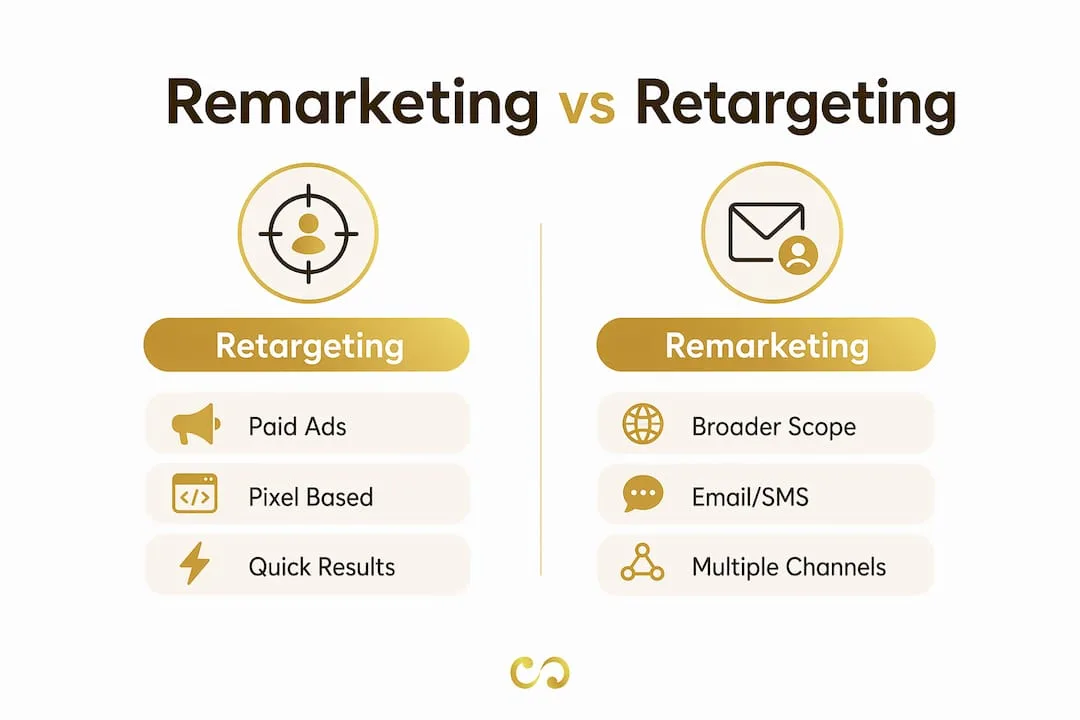
Remarketing vs retargeting: what is the real difference?
Most marketers use the two terms interchangeably, and in conversation that is fine. The distinction matters when you plan a full-funnel strategy.
Retargeting means paid advertising aimed at people based on their past behaviour online. It is mainly a paid media tactic: display, social and search ads shown to people who visited your site or engaged with your content.
Remarketing is broader. It includes retargeting ads but also covers email campaigns, SMS and any direct re-engagement with past visitors or customers through owned channels.
| Feature | Retargeting | Remarketing |
|---|---|---|
| Primary channel | Paid ads (display, social, search) | Paid ads plus email, SMS and owned media |
| Data source | Pixel and cookie tracking | Pixels, cookies and CRM lists |
| Scope | Narrow (ad-focused) | Broad (full-funnel) |
| Example | Google Display ad shown to a basket abandoner | Basket abandonment email followed by a Meta ad |
| Best for | Re-engaging people early in the journey | Converting and retaining people further down the funnel |
The practical answer is to use both. Retargeting ads keep you visible across the web, while remarketing emails or SMS deliver personalised offers that close the sale. Together they cover the path from awareness to purchase.
For a wider view of how these tactics fit into social media advertising, the channel mix matters as much as the message.
Effective remarketing strategies that drive real results
Knowing what remarketing is gets you started. Running it well is what separates profitable campaigns from wasted budget.

Segment audiences by intent. Someone who spent four minutes on your pricing page is worth far more than someone who left your homepage after ten seconds. Build separate lists for high-intent pages (pricing, checkout, product detail) and give them different creative and bids. One-size-fits-all remarketing is the most common reason campaigns underperform.
Use dynamic ads wherever you can. Behavioural segments paired with dynamic creative speak to each person's specific interest. A shopper who looked at a particular pair of trainers should see those trainers in your ad, not a generic brand image. Google Ads and Meta both support dynamic remarketing with product catalogue feeds.
Exclude people who have already bought. Failing to exclude buyers wastes budget and makes for a poor experience. Someone who just bought your product does not need an ad urging them to buy it. Set up exclusion audiences for recent purchasers and move that budget to upsell or cross-sell campaigns.
Combine pixel and CRM data. Using pixel-based and list-based remarketing together gives you more durable, cross-device targeting. CRM lists still work when people clear cookies or switch from desktop to mobile. Upload email lists to Google Customer Match and Meta Custom Audiences for lasting reach.
Run multi-channel campaigns. A visitor who sees your Google Display ad, then gets a basket abandonment email, then sees a Meta ad with an offer has several chances to come back. Coordinate messages so each channel builds on the last.
Pro Tip: Check audience sizes before launch. Google Ads needs a minimum number of active users in a list before it will serve ads, so check the current threshold in your account. If a list is too small, combine segments or extend the membership window to 30 or 60 days.
Keep a close eye on performance. Check click-through rate, conversion rate and frequency every week. If frequency keeps climbing without a matching rise in conversions, refresh the creative or tighten the audience. Remarketing also works best as one layer of a coordinated plan, as our guide to broader marketing strategies explains, rather than a standalone fix.
Key takeaways
Remarketing converts warm audiences better than cold traffic by combining pixel tracking, audience segments and messaging across Google Ads, Meta, email and SMS.
| Point | Details |
|---|---|
| Remarketing targets warm audiences | Past visitors have already shown interest, which makes them some of your most valuable ad audiences. |
| Five-step technical setup | Install a pixel, segment audiences, connect lists, launch ads and monitor conversions. |
| Dynamic ads are more relevant | Showing people the exact product they viewed is more relevant than broad brand creative. |
| Exclude converted customers | Remove recent buyers to protect budget and avoid a poor post-purchase experience. |
| Combine pixel and CRM targeting | List-based remarketing survives cookie deletion and device switching, extending your reach. |
Why remarketing is more than "following people around the web"
I have run remarketing campaigns for businesses ranging from local service providers to mid-sized e-commerce brands, and the biggest mistake I see is treating remarketing as a technical box to tick rather than a strategic discipline.
When I started, the standard advice was simple: install the pixel, build one audience, run one ad. That still works at a basic level. But the campaigns that really move revenue are the ones where the message reflects where the person is in their decision. A visitor who read your blog post needs a different message from someone who abandoned a large basket. Treating them the same leaves money on the table.
The other shift I have watched over the past few years is the growing importance of owned channels. Apple's privacy changes, Google's ongoing work on cookies and tighter platform rules mean pixel tracking alone is becoming less reliable. The businesses that will do well at remarketing from 2026 onwards are building strong email lists and CRM databases now. Those assets do not disappear when a browser update rolls out.
My honest advice: spend as much time on your audience strategy as on your ad creative. The best ad shown to the wrong segment is still a wasted impression. And keep testing. What works for one client rarely transfers perfectly to another, and continuous testing is what separates campaigns that scale from campaigns that stall.
Pawan
How LOOM Brand Designs can strengthen your remarketing campaigns
Remarketing only works as well as the creative behind it. If your ads look generic or your identity is inconsistent across channels, even the best targeting will underperform. LOOM Brand Designs builds the visual foundation that makes remarketing ads stop the scroll.
We offer professional graphic design for display and social ads and full website design and development to improve what happens after the click. If you are starting from scratch or refreshing your brand, the basic branding package gives you a coherent identity that carries across every ad format and channel. In remarketing, strong creative is often the difference between an ad that converts and one that gets ignored.
FAQ
What is remarketing in simple terms?
Remarketing means showing ads or sending messages to people who have already visited your website or interacted with your brand. The aim is to bring them back and turn them into customers.
How does remarketing work with Google Ads?
You add a Google tag to your site that places visitors in audience lists. Google then shows your ads to those people across the Display Network, YouTube and Gmail as they browse.
What is the difference between remarketing and retargeting?
Retargeting is paid advertising shown to past visitors based on pixel data. Remarketing is broader and includes email, SMS and CRM-based outreach alongside paid ads.
How do I set up remarketing for my business?
Install a Google Ads or Meta tracking pixel on your website, build audience lists based on behaviour, create relevant ads and launch campaigns aimed at those lists. Exclude people who have already bought and review performance weekly.
Why is remarketing important for conversion rates?
It reaches people who have already shown interest in your brand, so they are usually more receptive to your ads than cold audiences. That makes it one of the most efficient ways to recover value from visitors who left without buying.
The Hashtag Loom